Sissejuhatus
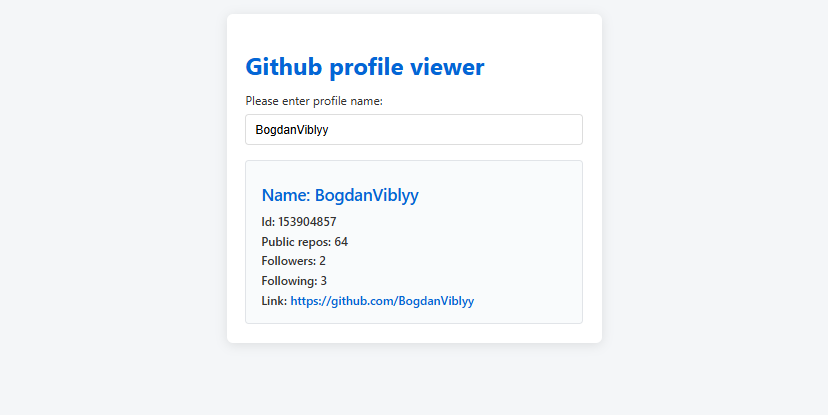
Selles harjutuses õpime kasutama Githubi avalikku API-t, et teha päring Github kasutaja kohta. Õpime, kuidas pärida kasutajanime, ID, profiili URL ja avalike repode arvu ning kuvada need lihtsal veebilehel.
Sammud:
1. Loo uus projekt HTML+JS keskkonnas
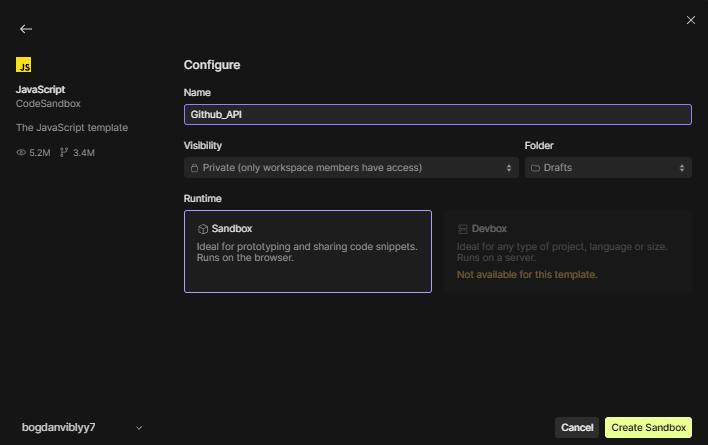
Soovitan kasutada näiteks CodeSandboxi või oma kohaliku HTML faili.
2. Kirjutame index.html:
<!DOCTYPE html>
<html>
  <head>
    <title>JavaScript Sandbox</title>
    <meta charset="UTF-8" />
    <link rel="stylesheet" href="styles.css" />
  </head>

  <body>
    <div id="app"></div>

    <script src="./index.mjs" type="module"></script>
  </body>
</html>
3: Lisame index.mjs:
let givenProfile = "";
let profileName = "";
let profileId = "";
let profileLink = "";
let profileRepos = "";
let profileFollowers = "";
let profileFollowing = "";

function renderPage() {
  document.getElementById("app").innerHTML = `
    <div>
      <h1>Github profile viewer</h1>
      <p>Please enter profile name: </p>
      <input value="${givenProfile}" placeholder="Enter GitHub username" />
      <div class="content">
        <h1 id="name">Name: ${profileName ? profileName : "-"}</h1>
        <p id="id">Id: ${profileId ? profileId : "-"}</p>
        <p id="repos">Public repos: ${profileRepos ? profileRepos : "-"}</p>
        <p id="followers">Followers: ${
          profileFollowers ? profileFollowers : "-"
        }</p>
        <p id="following">Following: ${
          profileFollowing ? profileFollowing : "-"
        }</p>
        <p id="profileurl">Link: ${
          profileLink && profileName
            ? `<a href="${profileLink}" target="_blank">${profileLink}</a>`
            : "-"
        }</p>
      </div>
    </div>
  `;

  const input = document.querySelector("input");
  input.addEventListener("change", updateValue);
}

function updateValue(e) {
  givenProfile = e.target.value;
  fetchProfile();
}

async function fetchProfile() {
  if (!givenProfile) {
    profileName = "";
    profileId = "";
    profileLink = "";
    profileRepos = "";
    profileFollowers = "";
    profileFollowing = "";
    renderPage();
    return;
  }
  try {
    const response = await fetch(
      `https://api.github.com/users/${givenProfile}`
    );
    const rateLimitRemaining = response.headers.get("X-rateLimit-Remaining");
    if (!response.ok) {
      profileName = "User not found";
      profileId = "-";
      profileLink = "";
      profileRepos = "-";
      profileFollowers = "-";
      profileFollowing = "-";
    } else {
      const data = await response.json();
      profileName = data.login || "-";
      profileId = data.id || "-";
      profileLink = data.html_url || "";
      profileRepos = data.public_repos || "-";
      profileFollowers = data.followers || "-";
      profileFollowing = data.following || "-";
    }
    if (rateLimitRemaining === "0") {
      profileName = "API rate limit reached. Try again later.";
      profileId = "";
      profileLink = "";
      profileRepos = "";
    }
    renderPage();
  } catch (e) {
    profileName = "Error";
    profileId = "-";
    profileLink = "";
    profileRepos = "-";
    profileFollowers = "-";
    profileFollowing = "-";
    renderPage();
  }
}

renderPage();
4: Lisame css:
body {
  font-family: "Segoe UI", Tahoma, Geneva, Verdana, sans-serif;
  background-color: #f4f6f8;
  margin: 20px;
  color: #333;
}

#app {
  max-width: 450px;
  margin: 0 auto;
  background-color: white;
  border-radius: 8px;
  box-shadow: 0px 3px 15px rgba(0, 0, 0, 0.1);
  padding: 25px;
}

h1 {
  color: #0366d6;
  font-weight: 700;
  margin-bottom: 15px;
}

p {
  font-size: 16px;
  margin: 8px 0;
}

input {
  width: 100%;
  font-size: 16px;
  padding: 10px 12px;
  border: 2px solid #ddd;
  border-radius: 5px;
  transition: border-color 0.3s ease;
  box-sizing: border-box;
  margin-bottom: 20px;
}

input:focus {
  border-color: #0366d6;
  outline: none;
}

.content {
  background-color: #f9fbfc;
  border: 1px solid #e1e4e8;
  padding: 15px 20px;
  border-radius: 5px;
}

a {
  color: #0366d6;
  text-decoration: none;
}

a:hover {
  text-decoration: underline;
}

#name {
  font-size: 22px;
  margin-bottom: 10px;
  font-weight: 600;
}

#id,
#repos,
#followers,
#following,
#profileurl {
  margin: 5px 0;
  font-weight: 500;
}
Lõpptulemus:
Kokkuvõte
- renderPage() – loob ja uuendab veebilehe sisu
- updateValue() – jälgib sisestusvälja muutusi
- fetchProfile() – teostab API päringud
On loodud leht mis teeb päringu Githubi ja näitab info: Nimi, Id, Public repos, Followers, Following, Link-